
This walkthrough builds a small desktop music player with tkinter for the interface and pygame.mixer for playback. It covers track selection, play/pause/stop state, volume, and elapsed time—the practical intent behind queries such as como hacer un reproductor de musica and python musica.
Use Python 3.11+ and install the non-standard packages in an isolated environment:
1
2
3
python -m venv .venv
source .venv/bin/activate  # Windows: .venv\Scripts\activate
python -m pip install pygame mutagen pillow
tkinter normally ships with Python on Windows and macOS. On Linux, install the Tk package supplied by the distribution.
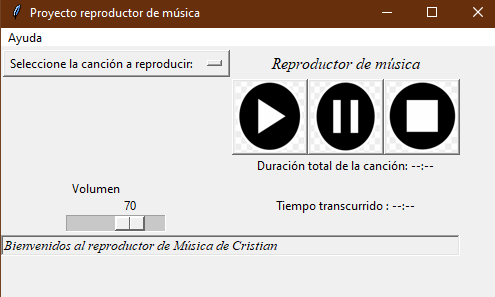
The code that follows produces the player shown above.
You will need these libraries:
| Standard library | Installed package |
|---|---|
tkinter, pathlib, time | pygame |
threading | mutagen |
Pillow |
Start by importing the libraries and configuring the music player class plus the launch function that holds the application container.
1
2
3
4
5
6
7
8
9
10
11
12
13
14
15
16
17
18
19
20
21
22
23
24
25
import tkinter as tk
import pygame
from pathlib import Path
from tkinter import HORIZONTAL, SUNKEN, W
from PIL import Image, ImageTk
from mutagen.mp3 import MP3
import threading
import time
from tkinter.messagebox import showinfo, showerror
class ReproductorMusical(tk.Frame):
    def __init__(self, container, *args, **kwargs):
        tk.Frame.__init__(self, container, *args, **kwargs)
        self.container=container
        self.cancion=""
        self.estado=""
        self.listaCanciones=[]

        self.menubar = tk.Menu(self.container)
        self.container.config(menu=self.menubar)
        self.subMenu = tk.Menu(self.menubar, tearoff=0)
        self.menubar.add_cascade(label="Help", menu=self.subMenu)

        pygame.mixer.init()
        self.pausado=False
        self.nombre_cancion=""
After creating the container, configure the About section, the status bar, and the volume slider (default level 70).
1
2
3
4
5
6
7
8
9
10
11

# Status bar and volume slider

# Status bar
self.estado = tk.Label(self.container, text="Welcome to Cristian's Music Player", relief=SUNKEN, anchor=W, font='Times 10 italic')
self.estado.grid(row=10, column=0, sticky="ew", columnspan=5)
# Volume slider
self.escala = tk.Scale(self.container,label='Volume', from_=0, to=100, orient=HORIZONTAL , command=ReproductorMusical.barra_volumen)
self.escala.set(70)
pygame.mixer.music.set_volume(0.4)
self.escala.grid(row=5, column=0, columnspan=1)
Next, configure the play, pause, and stop buttons. Keep the button images in the project directory and create a songs folder beside the script. Resolve paths from the script location so the app does not depend on the shell’s current directory.
1
2
3
4
5
6
7
8
9
10
11
12
13
14
15
16
17
18
19
20
21
22
23
24
25
26
27
28
29
30
31
32
33
34
# Playback buttons

## Play button
project_dir = Path(__file__).resolve().parent
self.im1=Image.open(project_dir / "play.png").resize((70, 70))
self.foto_play = ImageTk.PhotoImage(self.im1,master=container)
b=self.ReproducirCancion
self.boton=tk.Button(self.container, image=self.foto_play, command=b)
self.boton.grid(column=1, row=2)

## Pause button
self.im2=Image.open(project_dir / "pause.png").resize((70, 70))
self.foto_pause = ImageTk.PhotoImage(self.im2,master=container)
self.boton1=tk.Button(self.container, image=self.foto_pause, command=self.PausarCancion)
self.boton1.grid(column=2, row=2)

## Stop button
self.im3=Image.open(project_dir / "stop.png").resize((70, 70))
self.foto_stop = ImageTk.PhotoImage(self.im3,master=container)
self.boton2=tk.Button(self.container, image=self.foto_stop, command=self.DetenerCancion)
self.boton2.grid(column=3, row=2)


# Song selection without changing the process working directory
self.listaCanciones = [
    str(path) for path in (project_dir / "songs").iterdir()
    if path.suffix.lower() in {".mp3", ".wav", ".ogg"}
]

self.cancion=tk.StringVar(self.container)
self.cancion.set("Select a song to play: ")

self.menu=tk.OptionMenu(self.container, self.cancion, *self.listaCanciones)
self.menu.grid(column=0,row=0, columnspan=1)
Another addition is a track status panel showing total duration and elapsed time.
1
2
3
4
5
6
7
8
9
10
11
12
13
14
# Total duration and elapsed time labels
self.lengthlabel = tk.Label(self.container, text='Total track length: --:--')
self.lengthlabel.grid(column=1,row=4, columnspan=3)

self.currenttimelabel = tk.Label(self.container, text='Elapsed time: --:--')
self.currenttimelabel.grid(column=1,row=5, columnspan=3)


# App title
self.barra=tk.Label(self.container, text="Music player", font="Times 12 italic")
self.barra.grid(column=1,row=0, columnspan=3)

self.container.protocol("WM_DELETE_WINDOW", self.cierre)
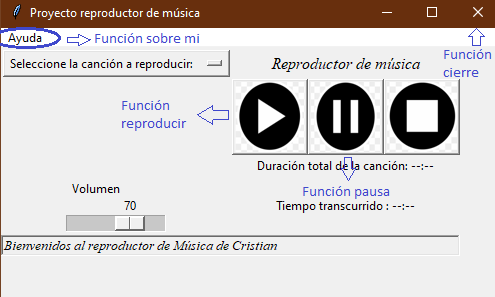
Wire the UI to methods for each action:
- About
- Play track
- Pause track
- Close application
- Volume slider
- Stop track
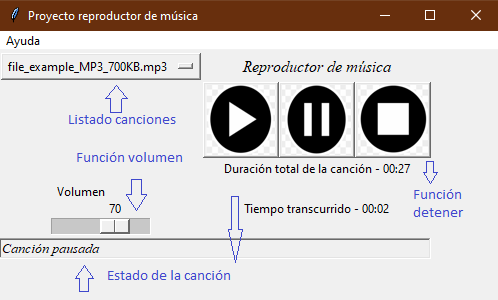
- Update status bar details
- Start elapsed-time counter
1
2
3
4
5
6
7
8
9
10
11
12
13
14
15
16
17
18
19
20
21
22
23
24
25
26
27
28
29
30
31
32
33
34
35
36
37
38
39
40
41
42
43
44
45
def Sobre_Mi(self):
    """
    Show a dialog with app and author information.
    """
    showinfo('About the player', 'This music player was built with Python Tkinter & Pygame, by Cristian Moreno')

def ReproducirCancion(self):
    """
    Resume if paused; otherwise load and play the selected track.
    """

    if self.pausado:
        pygame.mixer.music.unpause()
        self.estado['text'] = "Track resumed"
        self.pausado = False
    else:
        try:
            self.DetenerCancion()
            nombre_cancion=self.cancion.get()

            pygame.mixer.music.load(nombre_cancion)
            pygame.mixer.music.play()
            self.mostrar_detalles(nombre_cancion)

            self.estado['text'] = "Now playing:" + ' - ' + Path(nombre_cancion).name

        except (FileNotFoundError, pygame.error) as error:
            showerror("Playback error", str(error))

def PausarCancion(self):
    """
    Pause playback and update status.
    """

    self.pausado = True
    if self.pausado:
        pygame.mixer.music.pause()
        self.estado['text'] = "Track paused"

def cierre(self):
    """
    Stop playback and destroy the window on close.
    """
    ReproductorMusical.DetenerCancion(self)
    self.container.destroy()
1
2
3
4
5
6
7
8
9
10
11
12
13
14
15
16
17
18
19
20
21
22
23
24
25
26
27
28
29
30
31
32
33
34
35
36
37
38
39
40
41
42
43
44
45
46
47
48
49
50
51
52
53
54
55
def barra_volumen(val):
    """
    Map slider value to pygame volume.
    """
    volumen = int(val) / 100
    pygame.mixer.music.set_volume(volumen)


def DetenerCancion(self):
    """
    Stop playback.
    """
    pygame.mixer.music.stop()
    self.estado['text'] = "Track stopped"
def mostrar_detalles(self,reproducir_cancion):
    """
    Update elapsed-time display while the track plays.
    """
    nombre_cancion = Path(reproducir_cancion)

    if nombre_cancion.suffix.lower() == ".mp3":
        audio = MP3(reproducir_cancion)
        Duracion_total = audio.info.length
    else:
        a = pygame.mixer.Sound(reproducir_cancion)
        Duracion_total = a.get_length()


    mins, secs = divmod(Duracion_total, 60)

    mins1 = round(mins)
    secs1 = round(secs)

    timeformat = '{:02d}:{:02d}'.format(mins1, secs1)
    self.lengthlabel['text'] = "Total track length" + ' - ' + timeformat

    t1 = threading.Thread(target=self.comenzar_conteo, args=(Duracion_total,))
    t1.start()
def comenzar_conteo(self, t):
    """
    Count seconds while pygame.mixer.music.get_busy() is true; pause stops the counter.
    """
    current_time = 0
    while current_time <= t and pygame.mixer.music.get_busy():
        if self.pausado:
            continue
        else:

            mins, secs = divmod(current_time, 60)
            mins = round(mins)
            secs = round(secs)
            timeformat = '{:02d}:{:02d}'.format(mins, secs)
            self.currenttimelabel['text'] = "Elapsed time" + ' - ' + timeformat
            time.sleep(1)
            current_time += 1
Finally, instantiate the class to run the application.
1
2
3
4
5
container=tk.Tk()
container.title("Music player project")
container.geometry("500x250")
app = ReproductorMusical(container)
app.mainloop()
Production notes
- Tk widgets must be updated on the main thread. For a longer-lived app, replace the background label update with
container.after(...). - Do not busy-wait while paused; add a short sleep or model playback state with a
threading.Event. - Package icons and sample audio with explicit licenses.
- Test MP3, WAV, and OGG separately because codec support varies by platform.
Related on this site
If you landed here looking for a reproductor de música en Python (tkinter + pygame), this English walkthrough is the canonical version of that project.
- Automate sending email with Python — schedule scripts on Windows.
- Introduction to PyAutoGUI — desktop automation next door.
- More Python artifacts in Intelligence.