
This tutorial generates a dated data export, sends it with Python 3, and runs the job with Windows Task Scheduler. It addresses enviar correo con Python without putting a Gmail password in source code.

The first step to make the automatic sending function is generating a .py file with the following code. We will use a online database which is in the path “url”. This database contains details about the country’s basic characteristics, such as money, resources, and so on.
1
2
3
4
import pandas as pd
url = 'https://raw.githubusercontent.com/lorey/list-of-countries/master/csv/countries.csv'
df = pd.read_csv(url, sep=";")
ruta:'' # Here goes the path where the databases will be.
We program the generation of the date, specifically the sending day with the library datetime, as we show up follow, and we save the database in an excel file in the specified path previously:
1
2
3
4
import datetime
fecha=datetime.date.today().strftime('%Y-%m-%d')
df_final=ruta+"base_final_"+str(fecha)+".xlsx"
df.to_excel(df_final,index = False)
Send the attachment securely
Gmail removed “less secure apps.” For a personal account, enable two-step verification and create an app password. For Google Workspace, prefer OAuth or an administrator-approved relay. In either case, keep credentials outside the script and repository.
Set environment variables in the account that will run the scheduled task:
1
2
setx SMTP_USERNAME "email_sender@gmail.com"
setx SMTP_APP_PASSWORD "your-16-character-app-password"
Use EmailMessage, a verified TLS context, and a bounded timeout:
1
2
3
4
5
6
7
8
9
10
11
12
13
14
15
16
17
18
19
20
21
22
23
24
25
26
27
28
29
30
31
32
33
34
35
36
37
38
39
40
41
from datetime import date
from email.message import EmailMessage
from pathlib import Path
import mimetypes
import os
import smtplib
import ssl


def send_export(attachment_path: str | Path) -> None:
    username = os.environ["SMTP_USERNAME"]
    app_password = os.environ["SMTP_APP_PASSWORD"]
    recipients = ["email_receiver@example.com"]
    attachment = Path(attachment_path)

    message = EmailMessage()
    message["From"] = username
    message["To"] = ", ".join(recipients)
    message["Subject"] = f"Daily data export {date.today():%Y-%m-%d}"
    message.set_content(
        "Hello,\n\nThe validated daily export is attached.\n"
        "This message was generated by the scheduled Python job."
    )

    mime_type, _ = mimetypes.guess_type(attachment.name)
    main_type, sub_type = (mime_type or "application/octet-stream").split("/", 1)
    message.add_attachment(
        attachment.read_bytes(),
        maintype=main_type,
        subtype=sub_type,
        filename=attachment.name,
    )

    context = ssl.create_default_context()
    with smtplib.SMTP("smtp.gmail.com", 587, timeout=30) as server:
        server.starttls(context=context)
        server.login(username, app_password)
        server.send_message(message)


send_export(df_final)
Do not log the password, message body, or confidential attachment. For high-volume or regulated delivery, use a transactional email service with auditable credentials and explicit retention controls instead of personal Gmail. We continue to program the script that runs the code automatically after setting up the python in the.py format. To accomplish this, we must first extract the path where the python code must run.
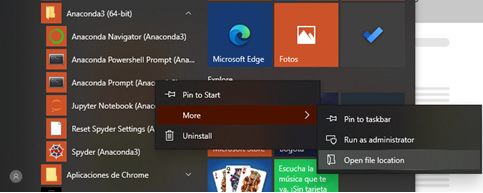
We go to the carpets where the files related to Anaconda’s PowerShell.

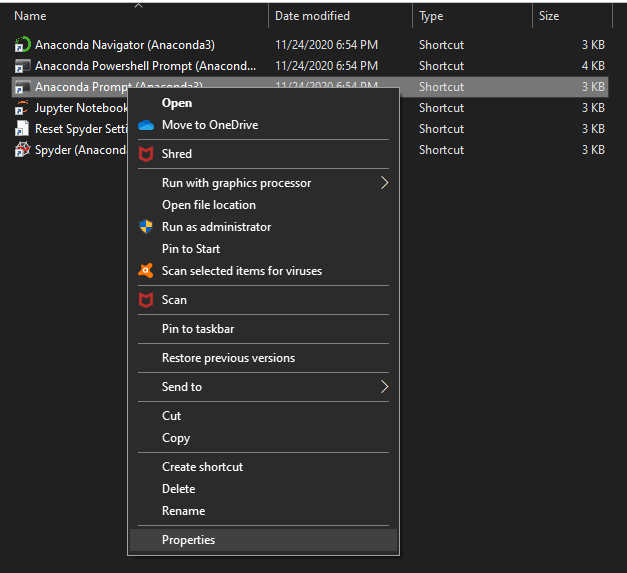
We go to the properties of the file “Anaconda Prompt”.
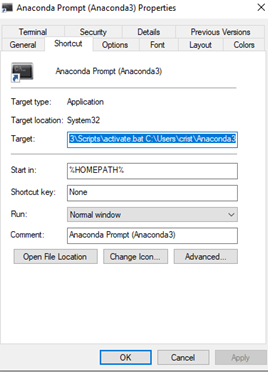
Once the program was configured, we copy the path into label “Target”.
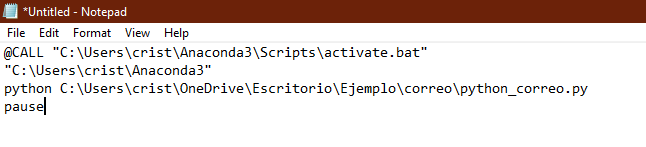
We create a notepad file, we page the previous path, and we modify it in the following way:
For this step, we transform the name of the notepad file and save it with .bat extensions, like this: “envio_automatico.bat”We open the Task scheduler of Windows and go to create a new task. We introduce the name and description of the task.
We add the trigger which is a daily routine that runs at noon since December 1, 2020.
Finally, we add an action that is the previous script .bat that we built from the notepad file, as well as the Python’s path of execution.
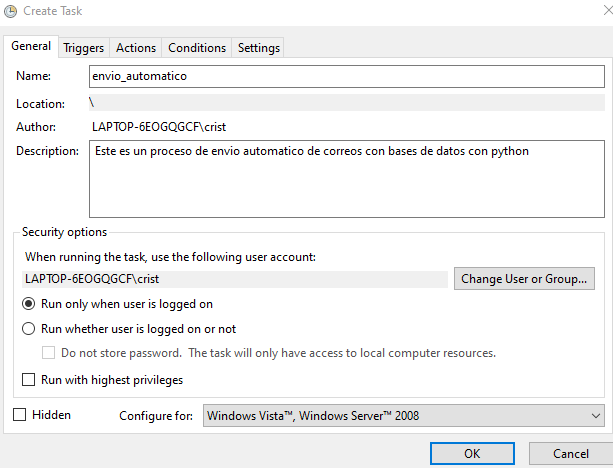
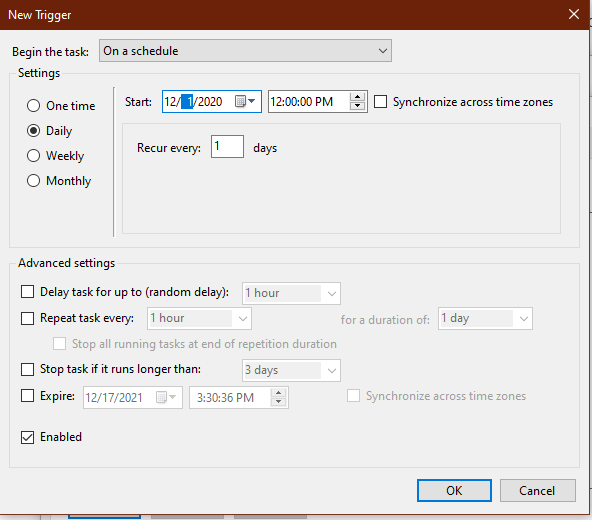
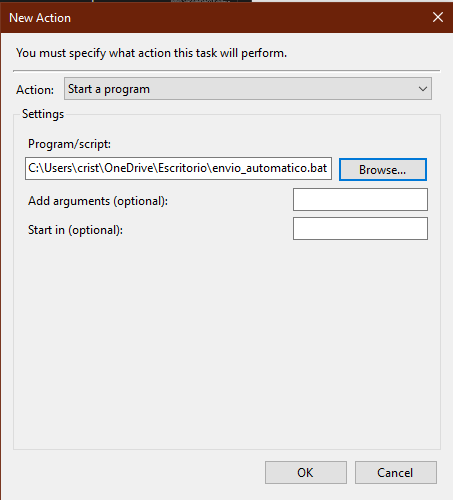
That is how the task should look in the Task Scheduler: 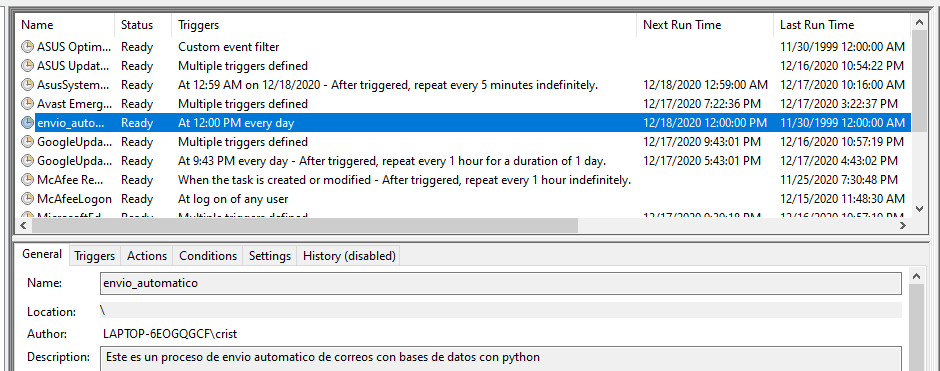
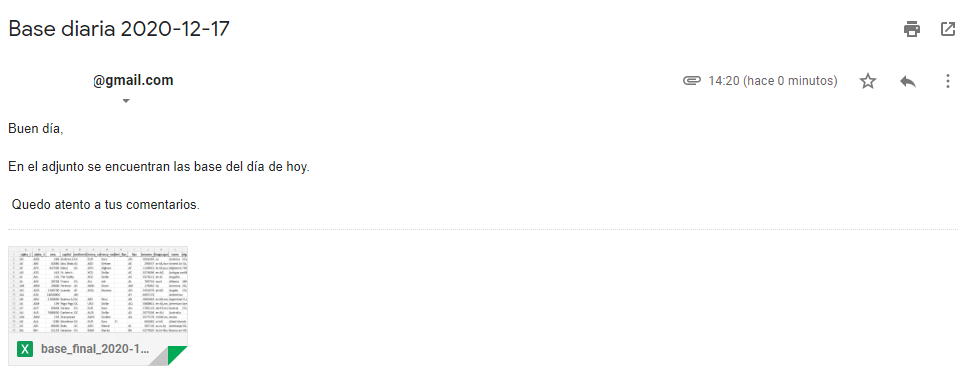
Finally, the result of all the previous processes is an automatic email that is sent every day like it shows up next:
Disadvantages: of the process:
- The computer must be turned on at all time.
- If we send confidential information, there is a degree of danger. There is a third-party interference (The library used in python for the email sending)
Potencial improves in the process:
- You can develop it in a virtual machine in the cloud. It would run without any human intervention.
Related on this site
Useful if you searched for enviar correo con Python / automatizar envío de email:
- Music player with tkinter & pygame — another desktop Python build.
- ICFES API → BigQuery — from script to data pipeline.
- Intelligence — full artifact grid.