
If you use Cursor, Claude Desktop, or Codex next to your data stack, you have probably seen this: the model writes SELECT * on a huge table, or drifts into SQL you did not ask for.
MCP means Model Context Protocol. It is a small standard so an AI assistant can call tools you write—list a table, run a query, fetch a file—instead of guessing in chat. The same server file works across clients that support MCP.
BigQuery is Google’s data warehouse in the cloud. GCP is Google Cloud Platform, where the project and credentials live.
This tutorial builds one Python 3 file called server.py. The code blocks below are pieces of that same file, in order. At the end you get the full file to copy in one shot if you prefer.
There is also a short bash command to install libraries, and JSON snippets to wire the server into Cursor, Claude, or Codex. Nothing else.
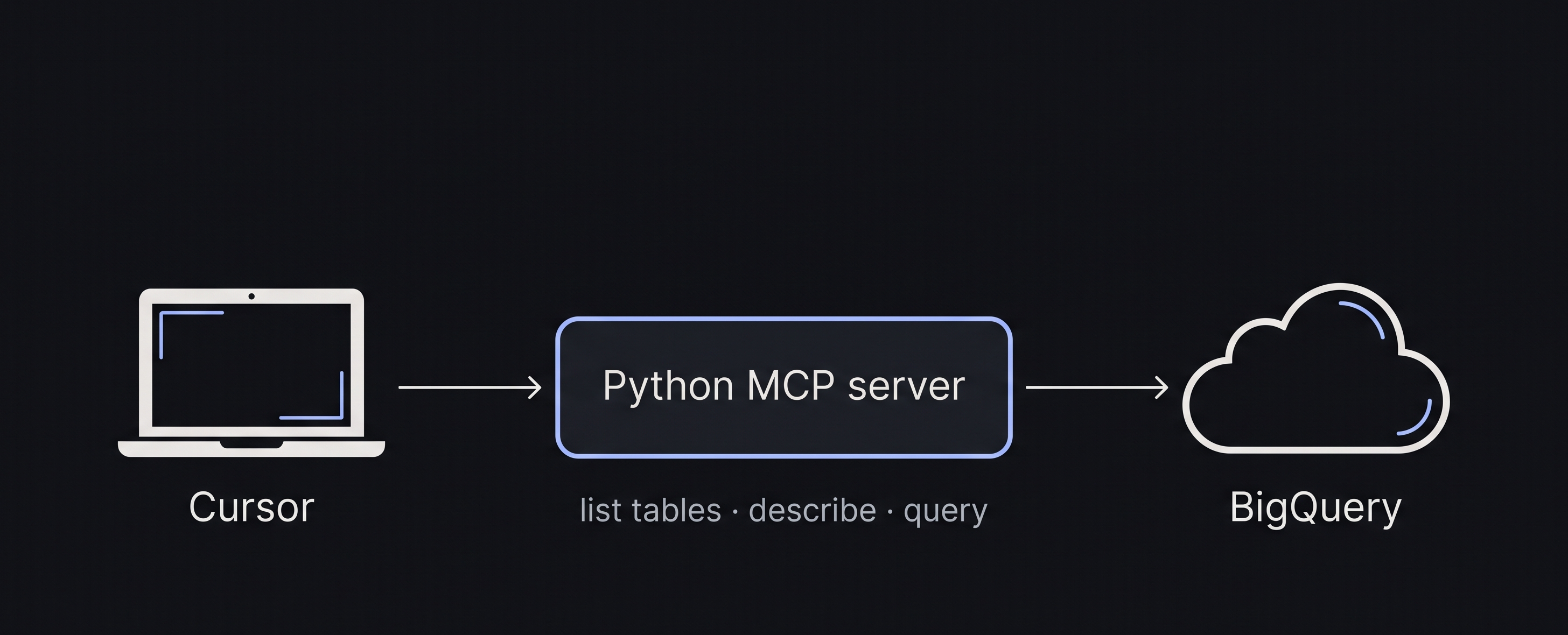 Diagram: AI-assisted, cropped for this post. Label on the left can read Cursor, Claude, or Codex—the flow is the same.
Before you open the editor
You need:
- Python 3.10+ installed (
python3 --version). - A GCP project with BigQuery enabled.
- A service account JSON key with read access to one dataset.
In the terminal (bash), point Python at that key:
1
export GOOGLE_APPLICATION_CREDENTIALS="/path/to/your-key.json"
Install the two Python packages we use:
1
pip install mcp google-cloud-bigquery
Create an empty file next to where you keep scripts:
1
server.py
Everything from here goes inside server.py, top to bottom.
Part A — Settings (top of server.py)
Open server.py and paste this first block. Change PROJECT and DATASET to yours.
1
2
3
4
5
6
7
8
9
10
11
12
# server.py — Python 3
import json
from google.cloud import bigquery
from mcp.server.fastmcp import FastMCP

PROJECT = "your-gcp-project"
DATASET = "analytics"
MAX_BYTES = 500_000_000   # ~500 MB max per query
MAX_ROWS = 200            # max rows sent back to the chat

client = bigquery.Client(project=PROJECT)
mcp = FastMCP("bigquery-tools")
Part B — A simple SQL check (still in server.py)
Add these functions below Part A. They only allow read queries (SELECT / WITH).
1
2
3
4
5
6
7
8
9
10
11
12
13
14
15
16
17
18
19
20
21
22
23
24
25
26
def sql_is_safe(query):
    q = query.strip().lower()
    if not (q.startswith("select") or q.startswith("with")):
        return False
    bad_words = ["insert ", "update ", "delete ", "drop ", "create ", "alter ", "merge "]
    return not any(w in q for w in bad_words)


def run_read_query(sql, params=None):
    if not sql_is_safe(sql):
        raise ValueError("Only read-only SELECT/WITH queries are allowed.")

    params = params or {}
    job_config = bigquery.QueryJobConfig(maximum_bytes_billed=MAX_BYTES)
    job_config.query_parameters = [
        bigquery.ScalarQueryParameter(name, "STRING", value)
        for name, value in params.items()
    ]

    rows = client.query(sql, job_config=job_config).result()
    out = []
    for row in rows:
        out.append(dict(row.items()))
        if len(out) >= MAX_ROWS:
            break
    return out
maximum_bytes_billed stops one heavy query from scanning too much data. @dept in SQL pairs with params={"dept": "Antioquia"}—do not paste user text straight into the query string.
Part C — Three tools for the MCP client (still in server.py)
Add this block below Part B. The @mcp.tool() lines register functions that Cursor, Claude, or Codex can call.
1
2
3
4
5
6
7
8
9
10
11
12
13
14
15
16
17
18
19
20
21
22
@mcp.tool()
def list_tables():
    """Table names in the allowed dataset."""
    tables = client.list_tables(f"{PROJECT}.{DATASET}")
    return [t.table_id for t in tables]


@mcp.tool()
def describe_table(table_name):
    """Column names, types, and row count."""
    full_name = f"{PROJECT}.{DATASET}.{table_name}"
    t = client.get_table(full_name)
    columns = [{"name": f.name, "type": f.field_type} for f in t.schema]
    return {"table": full_name, "rows": t.num_rows, "columns": columns}


@mcp.tool()
def run_query(sql, params_json="{}"):
    """Read-only SQL. params_json example: {\"dept\": \"Antioquia\"}."""
    params = json.loads(params_json) if params_json else {}
    rows = run_read_query(sql, params)
    return {"row_count": len(rows), "rows": rows}
Test the file from bash:
1
python3 server.py
If it starts without errors, you are fine. Stop it with Ctrl+C.
Full server.py (copy-paste version)
If you would rather not assemble parts, here is the complete Python file:
1
2
3
4
5
6
7
8
9
10
11
12
13
14
15
16
17
18
19
20
21
22
23
24
25
26
27
28
29
30
31
32
33
34
35
36
37
38
39
40
41
42
43
44
45
46
47
48
49
50
51
52
53
54
55
56
57
58
59
# server.py — Python 3
import json
from google.cloud import bigquery
from mcp.server.fastmcp import FastMCP

PROJECT = "your-gcp-project"
DATASET = "analytics"
MAX_BYTES = 500_000_000
MAX_ROWS = 200

client = bigquery.Client(project=PROJECT)
mcp = FastMCP("bigquery-tools")


def sql_is_safe(query):
    q = query.strip().lower()
    if not (q.startswith("select") or q.startswith("with")):
        return False
    bad_words = ["insert ", "update ", "delete ", "drop ", "create ", "alter ", "merge "]
    return not any(w in q for w in bad_words)


def run_read_query(sql, params=None):
    if not sql_is_safe(sql):
        raise ValueError("Only read-only SELECT/WITH queries are allowed.")
    params = params or {}
    job_config = bigquery.QueryJobConfig(maximum_bytes_billed=MAX_BYTES)
    job_config.query_parameters = [
        bigquery.ScalarQueryParameter(name, "STRING", value)
        for name, value in params.items()
    ]
    rows = client.query(sql, job_config=job_config).result()
    out = []
    for row in rows:
        out.append(dict(row.items()))
        if len(out) >= MAX_ROWS:
            break
    return out


@mcp.tool()
def list_tables():
    tables = client.list_tables(f"{PROJECT}.{DATASET}")
    return [t.table_id for t in tables]


@mcp.tool()
def describe_table(table_name):
    full_name = f"{PROJECT}.{DATASET}.{table_name}"
    t = client.get_table(full_name)
    columns = [{"name": f.name, "type": f.field_type} for f in t.schema]
    return {"table": full_name, "rows": t.num_rows, "columns": columns}


@mcp.tool()
def run_query(sql, params_json="{}"):
    params = json.loads(params_json) if params_json else {}
    rows = run_read_query(sql, params)
    return {"row_count": len(rows), "rows": rows}
Parts A–C and this block are the same code—use whichever path is easier for you.
Connect your MCP client (JSON, not Python)
The Python file is the same for every client. Only the config file path changes.
Cursor
Create or edit ~/.cursor/mcp.json:
1
2
3
4
5
6
7
8
9
10
11
{
  "mcpServers": {
    "bigquery-tools": {
      "command": "python3",
      "args": ["/full/path/to/server.py"],
      "env": {
        "GOOGLE_APPLICATION_CREDENTIALS": "/full/path/to/key.json"
      }
    }
  }
}
Restart Cursor. In the MCP tools panel you should see list_tables, describe_table, and run_query.
Claude Desktop
Edit Claude’s MCP config (on macOS, often ~/Library/Application Support/Claude/claude_desktop_config.json). Use the same mcpServers block as above—paths and env vars included.
Restart Claude Desktop and check that the three tools appear.
Codex
OpenAI Codex (CLI or IDE integration) also supports MCP servers. Add the same JSON under Codex’s MCP settings; the exact file path depends on your install—see the Codex MCP docs for your OS.
After a restart, you should see the same three tools.
Try it
Whichever client you use, start with a small prompt: “Use describe_table on my_table”. Then a narrow SELECT with a WHERE clause.
Example query (Python, optional test)
You can test run_read_query in a separate short script or a notebook—still Python:
1
2
3
4
5
6
7
8
9
sql = """
SELECT school_id, avg_score
FROM `{project}.{dataset}.scores`
WHERE department = @dept
LIMIT 50
""".format(project=PROJECT, dataset=DATASET)

rows = run_read_query(sql, params={"dept": "Cundinamarca"})
print(rows[:3])
Replace table and column names with yours.
How this fits the rest of the site
This site already has a post that loads Colombian ICFES data into BigQuery (ICFES + BigQuery). That is step one: get tables into the warehouse.
This MCP post is step two: let an assistant in Cursor, Claude, or Codex read those tables through fixed tools—without you copying SQL from chat into the BigQuery console.
Same data, two moments: load (ICFES tutorial) → query with guardrails (this post).
Limits
- IAM (who the service account can see) still rules access—not this script.
- The SQL check blocks obvious mistakes, not every attack.
- This setup is for your machine. Shared servers need extra auth later.