
Below I show how to build a music player using object-oriented programming in Python.
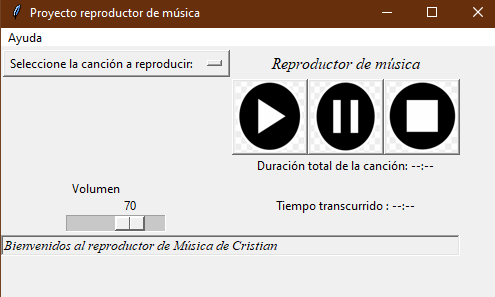
The code that follows produces the player shown above.
You will need these libraries:
| Library | Library |
|---|---|
| tkinter | pygame |
| os | mutagen |
| PIL | time |
| threading |
Start by importing the libraries and configuring the music player class plus the launch function that holds the application container.
1
2
3
4
5
6
7
8
9
10
11
12
13
14
15
16
17
18
19
20
21
22
23
24
25
26
27
28
29
30
import tkinter as tk
import pygame
import os
from tkinter import HORIZONTAL,SUNKEN, W
from PIL import Image, ImageTk
try:
    from mutagen.mp3 import MP3
except:
    raise ValueError('Install mutagen with: pip install mutagen')

    from mutagen.mp3 import MP3
import threading
import time
from tkinter.messagebox import showinfo, showerror
class ReproductorMusical(tk.Frame):
    def __init__(self, scontainer, *args, **kwargs):
        tk.Frame.__init__(self, container, *args, **kwargs)
        self.container=container
        self.cancion=""
        self.estado=""
        self.listaCanciones=[]

        self.menubar = tk.Menu(self.container)
        self.container.config(menu=self.menubar)
        self.subMenu = tk.Menu(self.menubar, tearoff=0)
        self.menubar.add_cascade(label="Help", menu=self.subMenu)

        pygame.mixer.init()
        self.pausado=False
        self.nombre_cancion=""
After creating the container, configure the About section, the status bar, and the volume slider (default level 70).
1
2
3
4
5
6
7
8
9
10
11

# Status bar and volume slider

# Status bar
self.estado = tk.Label(self.container, text="Welcome to Cristian's Music Player", relief=SUNKEN, anchor=W, font='Times 10 italic')
self.estado.grid(row=10, column=0, sticky="ew", columnspan=5)
# Volume slider
self.escala = tk.Scale(self.container,label='Volume', from_=0, to=100, orient=HORIZONTAL , command=ReproductorMusical.barra_volumen)
self.escala.set(70)
pygame.mixer.music.set_volume(0.4)
self.escala.grid(row=5, column=0, columnspan=1)
Next, configure the play, pause, and stop buttons. Button images can be downloaded as .png files. Create a folder named Canciones in the same directory as the .py or .ipynb file.
1
2
3
4
5
6
7
8
9
10
11
12
13
14
15
16
17
18
19
20
21
22
23
24
25
26
27
28
29
30
31
32
# Playback buttons

## Play button
ruta=""
self.im1=Image.open(ruta+'play.png').resize((70, 70))
self.foto_play = ImageTk.PhotoImage(self.im1,master=container)
b=self.ReproducirCancion
self.boton=tk.Button(self.container, image=self.foto_play, command=b)
self.boton.grid(column=1, row=2)

## Pause button
self.im2=Image.open(ruta+'pause.png').resize((70, 70))
self.foto_pause = ImageTk.PhotoImage(self.im2,master=container)
self.boton1=tk.Button(self.container, image=self.foto_pause, command=self.PausarCancion)
self.boton1.grid(column=2, row=2)

## Stop button
self.im3=Image.open(ruta+'stop.png').resize((70, 70))
self.foto_stop = ImageTk.PhotoImage(self.im3,master=container)
self.boton2=tk.Button(self.container, image=self.foto_stop, command=self.DetenerCancion)
self.boton2.grid(column=3, row=2)


# Song selection from Canciones folder
os.chdir(ruta+"Canciones/")
self.listaCanciones=os.listdir()

self.cancion=tk.StringVar(self.container)
self.cancion.set("Select a song to play: ")

self.menu=tk.OptionMenu(self.container, self.cancion, *self.listaCanciones)
self.menu.grid(column=0,row=0, columnspan=1)
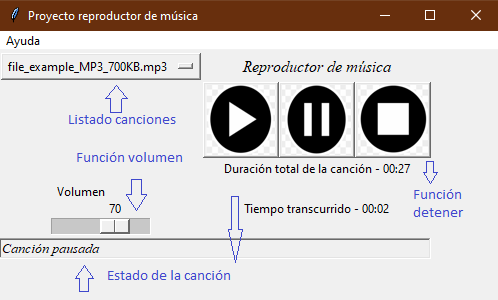
Another addition is a track status panel showing total duration and elapsed time.
1
2
3
4
5
6
7
8
9
10
11
12
13
14
# Total duration and elapsed time labels
self.lengthlabel = tk.Label(self.container, text='Total track length: --:--')
self.lengthlabel.grid(column=1,row=4, columnspan=3)

self.currenttimelabel = tk.Label(self.container, text='Elapsed time: --:--')
self.currenttimelabel.grid(column=1,row=5, columnspan=3)


# App title
self.barra=tk.Label(self.container, text="Music player", font="Times 12 italic")
self.barra.grid(column=1,row=0, columnspan=3)

self.container.protocol("WM_DELETE_WINDOW", self.cierre)
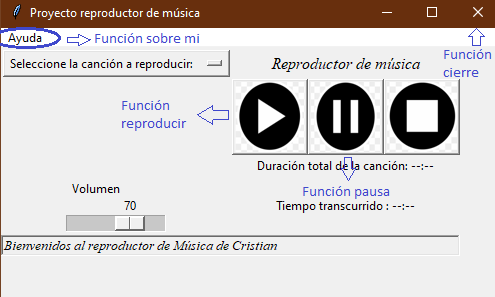
Wire the UI to methods for each action:
- About
- Play track
- Pause track
- Close application
- Volume slider
- Stop track
- Update status bar details
- Start elapsed-time counter
1
2
3
4
5
6
7
8
9
10
11
12
13
14
15
16
17
18
19
20
21
22
23
24
25
26
27
28
29
30
31
32
33
34
35
36
37
38
39
40
41
42
43
44
45
46
def Sobre_Mi(self):
    """
    Show a dialog with app and author information.
    """
    showinfo('About the player', 'This music player was built with Python Tkinter & Pygame, by Cristian Moreno')

def ReproducirCancion(self):
    """
    Resume if paused; otherwise load and play the selected track.
    """

    if self.pausado:
        pygame.mixer.music.unpause()
        self.estado['text'] = "Track resumed"
        self.pausado = False
    else:
        try:
            self.DetenerCancion()
            nombre_cancion=self.cancion.get()

            pygame.mixer.music.load(nombre_cancion)
            pygame.mixer.music.play()
            self.mostrar_detalles(nombre_cancion)

            self.estado['text'] = "Now playing:" + ' - ' + os.path.basename(nombre_cancion)

        except:
            showerror('File not found', 'The player could not find a track at the path. Please check again.')
            print("Error")

def PausarCancion(self):
    """
    Pause playback and update status.
    """

    self.pausado = True
    if self.pausado:
        pygame.mixer.music.pause()
        self.estado['text'] = "Track paused"

def cierre(self):
    """
    Stop playback and destroy the window on close.
    """
    ReproductorMusical.DetenerCancion(self)
    self.container.destroy()
1
2
3
4
5
6
7
8
9
10
11
12
13
14
15
16
17
18
19
20
21
22
23
24
25
26
27
28
29
30
31
32
33
34
35
36
37
38
39
40
41
42
43
44
45
46
47
48
49
50
51
52
53
54
55
def barra_volumen(val):
    """
    Map slider value to pygame volume.
    """
    volumen = int(val) / 100
    pygame.mixer.music.set_volume(volumen)


def DetenerCancion(self):
    """
    Stop playback.
    """
    pygame.mixer.music.stop()
    self.estado['text'] = "Track stopped"
def mostrar_detalles(self,reproducir_cancion):
    """
    Update elapsed-time display while the track plays.
    """
    nombre_cancion = os.path.splitext(reproducir_cancion)

    if nombre_cancion[1] == '.mp3':
        audio = MP3(reproducir_cancion)
        Duracion_total = audio.info.length
    else:
        a = pygame.mixer.Sound(reproducir_cancion)
        Duracion_total = a.get_length()


    mins, secs = divmod(Duracion_total, 60)

    mins1 = round(mins)
    secs1 = round(secs)

    timeformat = '{:02d}:{:02d}'.format(mins1, secs1)
    self.lengthlabel['text'] = "Total track length" + ' - ' + timeformat

    t1 = threading.Thread(target=self.comenzar_conteo, args=(Duracion_total,))
    t1.start()
def comenzar_conteo(self, t):
    """
    Count seconds while pygame.mixer.music.get_busy() is true; pause stops the counter.
    """
    current_time = 0
    while current_time <= t and pygame.mixer.music.get_busy():
        if self.pausado:
            continue
        else:

            mins, secs = divmod(current_time, 60)
            mins = round(mins)
            secs = round(secs)
            timeformat = '{:02d}:{:02d}'.format(mins, secs)
            self.currenttimelabel['text'] = "Elapsed time" + ' - ' + timeformat
            time.sleep(1)
            current_time += 1
Finally, instantiate the class to run the application.
1
2
3
4
5
container=tk.Tk()
container.title("Music player project")
container.geometry("500x250")
app = ReproductorMusical(container)
app.mainloop()
Improvements
- Improve styling—colors and typography.
- Support YouTube playback via URL.
- Add playback speed control (faster or slower).